
CARFAX - New & Used Cars review
 Analysis by GetAllApps
Shopping for a car can turn into a string of small unknowns: Is the asking price reasonable? Does the vehicle’s past deserve a closer look? Is the listing still worth a trip across town? CARFAX - New & Used Cars is an Auto & Vehicles app from CARFAX, Inc that brings nearby car listings, price alerts, and vehicle-history details into one place. I find it most useful as a research companion—not as a substitute for inspecting a car or checking its history carefully before buying.
Where the search can get stuck
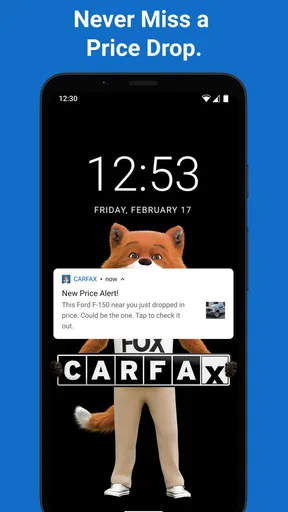
The app’s appeal is straightforward: rather than keeping a few promising cars in browser tabs or notes, I can use one mobile app to explore nearby options and follow changes that matter to my search. Price alerts are particularly practical when I’m interested in a car but not ready to contact the seller immediately. They give me a reason to revisit a listing instead of relying on memory or repeatedly searching from scratch.
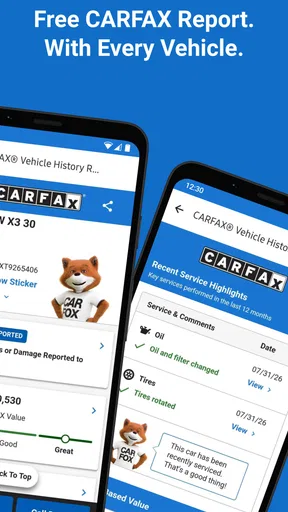
Vehicle-history information is another important part of the experience. It can help me decide which listings deserve more attention and what questions to ask before arranging a viewing. That is a useful early filter, but I would not treat a history report as proof that a car is mechanically sound. It helps inform a decision; it does not replace a professional inspection, a test drive, or a conversation with the seller.
The first friction point in any car search is often not the app itself but an incomplete idea of what counts as a good match. I recommend deciding on a sensible budget and a short list of must-haves before browsing. Otherwise, it is easy to get pulled toward attractive listings that are too far away, unsuitable, or outside the amount you actually want to spend. A focused search makes alerts more useful too, because there is less noise to sort through.
It also helps to separate “interesting” from “ready to buy.” A listing can look promising while still needing basic checks: whether its details fit your needs, whether its price makes sense compared with similar cars, and whether the history raises questions. I use the app to build a shortlist, not to rush from a promising card to a purchase decision.
Setup checks that save time
Before relying on alerts, I would check that the search reflects the area and kind of car I genuinely want. A broad search may surface more possibilities, but it can also make updates less relevant. A narrower set of preferences is usually easier to manage, especially if I’m comparing a few specific types of vehicle rather than casually browsing everything nearby.
If an alert does not seem helpful, I would first review the search it is tied to and make sure it still matches my plans. A change in budget, preferred vehicle, or shopping area can make earlier choices less useful. I’d also check the app’s notification settings on the phone if updates are not appearing as expected. That is a sensible general troubleshooting step, rather than assuming that a listing or alert has disappeared.
For a more reliable comparison, I keep notes outside the app on the details that matter most to me: asking price, location, questions for the seller, and any concerns to investigate. This is a small but valuable habit when several similar cars are in the running. It prevents a common shopping mistake—remembering one attractive detail about each listing while forgetting which car had which drawback.
The app is free, and its age rating is Everyone, so there is no purchase price to weigh before trying it. It has a 4.7 average from around 36,000 ratings, which suggests many users find it useful, though that should not be mistaken for a guarantee that every listing or report will answer every buyer’s questions. It has been available since June 29, 2012, and version 6.52.1 is the current version. On iPhone, it requires iOS 11 or later.
A workflow for recovering a stalled search
When a listing stops being useful—perhaps the price changes or the car no longer fits my plans—I try not to let it derail the whole search. I return to the criteria I set, remove the option from my active shortlist if appropriate, and compare the remaining cars on the same handful of points. That keeps the process grounded in what I need rather than in how much time I have already spent considering one vehicle.
If a price alert prompts me to revisit a car, I treat it as a cue to reassess, not as an instruction to act. I check whether the new price changes the value proposition, then look again at the vehicle history and the questions I still need answered. A lower asking price can make a car worth another look, but it does not by itself resolve concerns about condition, suitability, or the seller’s answers.
One useful workflow is to use history details to prepare specific questions before calling or messaging a seller. Instead of asking vaguely whether the car is “in good shape,” I can ask about anything in the available history that needs clarification and listen for a direct explanation. If the answer is unclear, I can pause and seek an independent inspection. This makes the information more actionable without pretending that an app can settle every issue.
Another practical approach is to compare cars in stages. First, screen for basic fit and price. Next, review the history information and note unanswered questions. Finally, arrange the more time-consuming steps only for the strongest candidates. That sequence can save trips and reduce the temptation to make a decision simply because a viewing took effort to arrange.
When the app is not the cause
Not every frustrating moment points to a software problem. A listing may be outdated, a seller may not respond, or the car may already be unavailable. Those are realities of shopping for used vehicles. If a listing’s details seem inconsistent, I would verify them with the seller before travelling and avoid treating an app display as a live confirmation of availability.
Likewise, a history summary should be read as one source of evidence, not the whole story. A clean-looking history does not tell me how the car feels on the road or whether a current mechanical problem exists. Conversely, an item that needs explanation does not automatically mean a car should be rejected; it means I should understand it before committing. The right next step depends on the vehicle and the quality of the answers I receive.
This distinction matters because buyers often expect a single tool to remove uncertainty. CARFAX can make research more organized, but the final checks still involve people and the vehicle itself. If I need detailed mechanical advice, I would turn to a qualified mechanic. If I want to understand whether a seller’s claims hold up, I would ask for documentation and arrange an inspection rather than relying on a listing description alone.
The app is also not the best fit for someone who only wants broad automotive news, repair guidance, or a purely local classifieds feed. Its strongest case is the combination of car-search discovery, price alerts, and vehicle-history research. A general classifieds app may be more convenient if the priority is simply seeing a large range of local listings; a mechanic or inspection service is the better choice for assessing condition. Those tools can complement this app rather than compete with it directly.
Who will get the most from it
I’d recommend it to people actively comparing new or used cars who want a mobile place to keep an eye on nearby listings and use history details as part of their screening. It can be especially helpful for a buyer who is patient: someone willing to set a direction, watch for changes, and investigate promising options rather than selecting the first appealing car.
For example, imagine I need a practical replacement but have not found the right one yet. I can narrow my search to the kind of vehicle I’d actually consider, review candidates as they appear, and use an alert to know when a listing’s price warrants another look. Before making the drive, I check the listing again, prepare questions based on its history information, and confirm the car is still available. That routine turns casual browsing into a more deliberate process.
Someone who has already chosen a specific car and only needs a physical condition check may not need to spend much time browsing here. The app can still provide useful context, but a direct seller conversation and independent inspection will matter more at that stage. Likewise, people who dislike maintaining a shortlist or comparing details may find that any car-search app becomes cluttered unless they first decide what they want.
CARFAX - New & Used Cars has over 5 million installs, and its long-running presence makes it a familiar option in this category. I see its value less in any one screen than in the way its search, alerts, and history information can support a careful buying routine. The main trade-off is that it helps organize research without removing the work of verifying a real vehicle.
My practical verdict
Overall, I’d keep CARFAX - New & Used Cars in the toolkit when shopping for a vehicle, especially if I’m comparing several candidates over time. Its free access makes it easy to try, and the mix of nearby listings, price alerts, and history details addresses useful parts of the search. I would use it to decide what deserves a closer look, not to decide that a car is automatically safe or fairly priced.
My best advice is to start with clear requirements, keep a simple comparison note, and treat alerts as reminders to reassess rather than as pressure to buy. Confirm important listing details with the seller, use history information to ask better questions, and arrange an independent inspection when a car becomes a serious candidate. If that is the kind of measured search you want, this app can make the process more manageable. If you need a definitive mechanical verdict or a guarantee that a listing is current, you will need help beyond the app.
Pros and cons
Pros
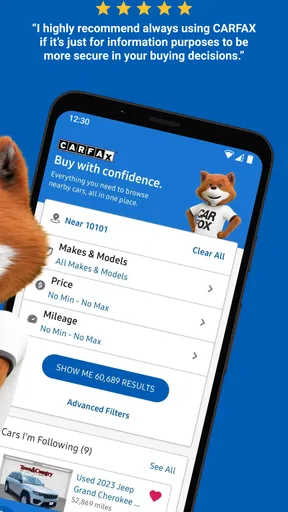
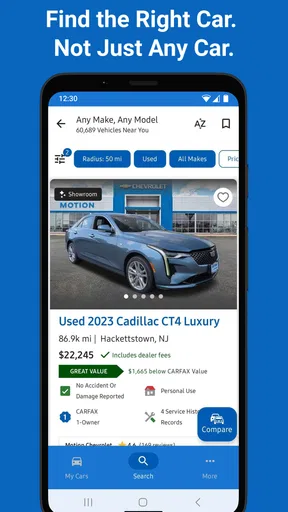
- Search listings by make model price and location.
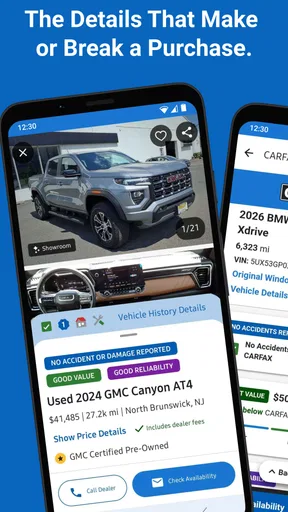
- Vehicle history reports can help inform buying decisions.
- Save favorite cars to revisit later.
- Contact sellers directly from eligible listings.
- Compare new and used vehicles in one app.
Cons
- Vehicle history reports may require an additional purchase.
- Listing details and availability can change without notice.
- Some cars may have incomplete vehicle history records.
- Search results depend on participating dealers and sellers.
- The app is primarily useful in the United States.


